● 도둑과 경찰의 역할
A. 도둑이 훔치려는 대상
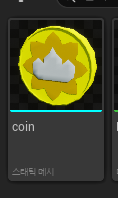
이전에 진행한 과제에서 사용했던 동전 메시를 가져왔다. 다른 보석이나 보물 등도 되겠지만 일단 구현을 해보는 것이 목표니까 그냥 동전을 훔치는 것으로 퉁쳤다.
public:
	//도둑이 훔칠 물건인 액터의 존재 확인
	void CheckThiefTargetActor();

	//도둑이 훔침
	void TargetStolen();

private:
	//도둑이 훔칠 물건 수
	int32 ThiefTarget;
먼저 게임 모드에서는 도둑이 훔칠 동전의 존재를 알아야 하고 그 아이템의 훔침 여부를 알아야 한다. 그러기 위한 함수와 변수를 추가했다.
void AMainGameMode::CheckThiefTargetActor()
{
	++ThiefTarget;
}

void AMainGameMode::TargetStolen()
{
	if (CurrentGameState != EGameState::Playing)
	{
		return;
	}

	if (--ThiefTarget <= 0)
	{
		CurrentGameState = EGameState::EndOfGame;
		UE_LOG(LogHiddenThief, Warning, TEXT("Thief Win"));
	}
}
동전 액터에서는 본인이 있음을 게임 모드에게 알리고 게임 모드는 호출된 만큼 카운트 한다. 그리고 게임 중 동전이 훔쳐지면 역시 관련 함수를 실행하여 카운트를 내린다. 이러다 모든 동전을 도둑이 훔치면 도둑이 승리한다.

다음은 동전 액터
private:
	//캐릭터와 겹칠 때 실행
	UFUNCTION()
	void OnCharacterOverlap(UPrimitiveComponent* OverlappedComp, AActor* OtherActor, UPrimitiveComponent* OtherComp,
		int32 OtherBodyIndex, bool bFromSweep, const FHitResult& SweepResult);

	//게임 모드
	UPROPERTY()
	class AMainGameMode* MainGameMode;

	//판정 범위인 콜라이더
	UPROPERTY(EditDefaultsOnly, meta = (AllowPrivateAccess = true))
	class USphereComponent* SphereCollider;

	//스태틱 메시
	UPROPERTY(EditDefaultsOnly, meta = (AllowPrivateAccess = true))
	UStaticMeshComponent* TargetMesh;

	//최소 회전 속도
	UPROPERTY(EditDefaultsOnly, Category="Item", meta = (AllowPrivateAccess=true))
	float MinRotatingSpeed;

	//최대 회전 속도
	UPROPERTY(EditDefaultsOnly, Category="Item", meta = (AllowPrivateAccess=true))
	float MaxRotatingSpeed;

	//정해진 회전 속도
	FRotator RotatingValue;
전에 했던 과제의 아이템 코드 중 상호 작용, 회전 속도 등 필요한 것을 가져왔다. 그리고 게임 모드를 캐싱하기 위한 변수도 선언했다.
void AThiefTarget::BeginPlay()
{
	Super::BeginPlay();

	//최대 회전 속도가 최소 회전 속도보다 낮으면 안됨
	if (MinRotatingSpeed > MaxRotatingSpeed)
		MaxRotatingSpeed = MinRotatingSpeed;

	//이 아이템의 회전 속도
	const float Speed = FMath::RandRange(MinRotatingSpeed, MaxRotatingSpeed);
	RotatingValue = FRotator(0, Speed, 0);

	//게임 모드
	MainGameMode = Cast<AMainGameMode>(GetWorld()->GetAuthGameMode());
	if (IsValid(MainGameMode))
	{
		//게임 모드에 이 액터가 있음을 알림
		MainGameMode->CheckThiefTargetActor();
	}
}
BeginPlay에서 아이템 회전값을 정한다. 그리고 게임 모드를 가져온다. 클라이언트라면 게임 모드가 없으니 바로 아래의 if문을 실행하지 못할 것이다. 이 if문에서 게임 모드에게 동전 아이템이 있음을 알린다.
void AThiefTarget::Tick(float DeltaTime)
{
	Super::Tick(DeltaTime);

	AddActorWorldRotation(RotatingValue * DeltaTime);
}
회전값을 지정했으면 Tick으로 돌린다.
void AThiefTarget::OnCharacterOverlap(UPrimitiveComponent* OverlappedComp, AActor* OtherActor,
	UPrimitiveComponent* OtherComp, int32 OtherBodyIndex, bool bFromSweep, const FHitResult& SweepResult)
{
	//서버에서 판정
	if (GetNetMode() == NM_Client)
	{
		return;
	}

	//플레이어 캐릭터와 겹친 경우에만 실행
	if (!OtherActor->ActorHasTag("Player"))
	{
		return;
	}

	//경찰은 무시
	AMainGameCharacter* MainGameChar = Cast<AMainGameCharacter>(OtherActor);
	AMainGamePlayerState* PlayerState = Cast<AMainGamePlayerState>(MainGameChar->GetPlayerState());
	if (PlayerState->bPolice)
	{
		return;
	}

	//게임 모드에게 코인 획득을 알림
	MainGameMode->TargetStolen();

	//사라짐
	SetActorHiddenInGame(true);
	SetActorTickEnabled(false);
	SetActorEnableCollision(false);
}
동전 아이템이 도둑인 플레이어에게 닿으면 훔친 것으로 본다. 단, 동전이 플레이어와 닿았는지는 서버에서 계산하도록 한다.
그 다음 태그를 통해 AI캐릭터인지 플레이어인지 구분하도록 한다. 이 태그는 나중에 블루프린트에서 추가한다.
플레이어가 맞다면 도둑인지 확인한다. 경찰이 물건 훔치는거 봤는가...
최종적으로 도둑인 플레이어와 닿았다면 게임 모드에게 훔쳐짐을 알려준 다음 게임에서 숨긴다. 제거(Destroy)가 아닌 숨김 처리를 하는 이유는 시스템상 단순한 숨기기가 제거보다 가벼운 작업이기 때문이다.

이렇게 만든 코드를 기반으로 블루프린트를 만들고 스태틱 메시를 동전으로 지정한다. 그리고 회전 속도도 지정한다.
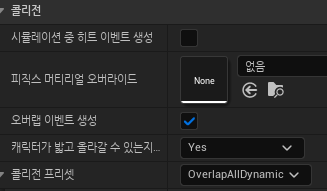

콜라이더와 동전에 대하여 콜리전 지정을 해야 함을 잊지 말자
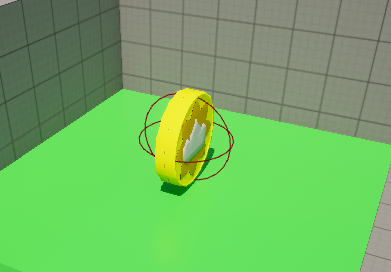
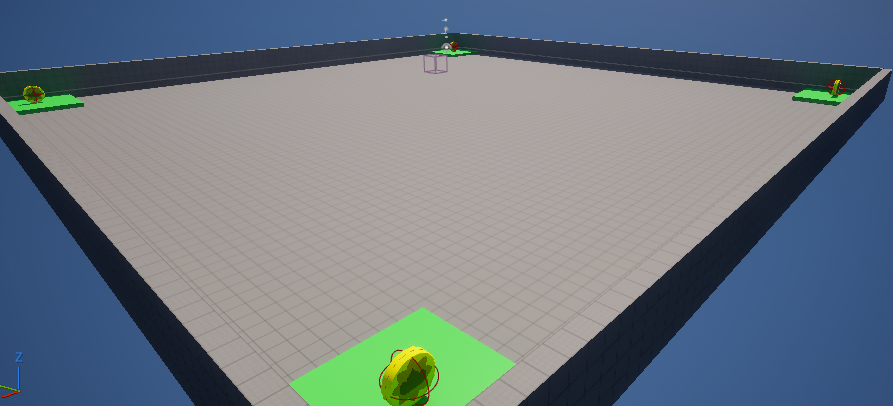
맵의 네 귀퉁이에 동전 액터를 배치한다.
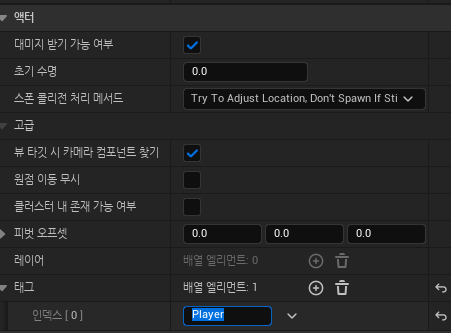
플레이어 캐릭터 블루프린트를 열고 태그를 지정한다. 디테일에서 '액터' 카테고리에 있다. 코드에 적은 대로 "Player"를 태그에 추가한다.
A -1. 왜 액터가 안사라질까
실행해보니 도둑인 플레이어로 닿으니 획득 처리는 된다. 그런데 획득한 동전이 사라지지 않는 문제가 발생했다.

이유는 간단했다. 리플레케이트를 안했기 때문이다. 즉시 동전 블루프린트를 열고 리플리케이트에 체크하면 된다.

문제 해결후 도둑으로 모든 동전을 획득하니 정상적으로 작동함을 확인했다.
B. 경찰의 목적
경찰은 그저 맵에 있는 도둑을 모두 죽이기만 하면 된다. 다만 NPC와 똑같이 생겼기 때문에 찾는 것이 문제일 뿐.
public:
	//도둑 죽임
	void ThiefDeath();
void AMainGameMode::ThiefDeath()
{
if (CurrentGameState != EGameState::Playing)
{
return;
}
if (--ThiefCount <= 0)
{
CurrentGameState = EGameState::EndOfGame;
UE_LOG(LogHiddenThief, Warning, TEXT("Police Win"));
}
}처음 게임을 시작할 때 도둑의 수를 '총 플레이어의 수 - 1'로 정했다. 그리고 경찰이 도둑을 죽일 때 마다 이 수치를 1씩 내리고 0이 되면 경찰이 승리하도록 만들면 된다.
//서버에서 실행하는 사망 처리
	UFUNCTION(Server, Reliable)
	void DoDeath();
	//void DeathMotionOrder();
게임모드에서 만든 함수를 어디서 실행할까 생각했는데 플레이어 캐릭터가 좋을 것 같다. 더 생각해보면 캐릭터 사망시 서버 RPC 함수를 거치는데 이 거쳐가는 서버 함수에서 게임 모드의 함수를 실행하면 되겠다. 이러면 함수가 사망 모션 외에 할 일이 생기니 함수 이름을 변경했다.
함수 이름을 변경했으니 이 함수를 호출하는 곳에서도 수정한다.
void AMainGameCharacter::DoDeath_Implementation()
{
	//서버에서 판정
	if (GetNetMode() == NM_Client)
	{
		return;
	}

	//게임 모드에게 도둑 사망을 알림
	if (AMainGameMode* MainGameMode = Cast<AMainGameMode>(GetWorld()->GetAuthGameMode()); IsValid(MainGameMode))
	{
		MainGameMode->ThiefDeath();
	}

	//사망 모션
	DeathMotion();
}
변경한 함수의 내용.
플레이어 캐릭터에서 게임 모드를 쓸 일은 이것 하나 뿐일테니 시작시 미리 캐싱할 필요는 없어보인다. 그냥 여기서 바로 캐스팅하자.

경찰로 도둑을 모두 쓰러뜨리면 경찰 승리 판정이 생김을 확인했다.
● 위젯을 통한 명확한 게임 진행 확인
게임 준비, 게임 시작, 게임 종료 모두 게임 화면에서는 알 수 없다. 위젯이 하나도 없기 때문이다. 그러니 위쳇을 추가한다.
A. 위젯 만들기

private:
	//화면 중앙에 표시할 텍스트
	UPROPERTY(EditDefaultsOnly, meta = (AllowPrivateAccess = true, BindWidget))
	UTextBlock* MainMessage;

	//뭐가 남았을까
	UPROPERTY(EditDefaultsOnly, meta = (AllowPrivateAccess = true, BindWidget))
	UTextBlock* RemainingLabel;

	//남은 개수
	UPROPERTY(EditDefaultsOnly, meta = (AllowPrivateAccess = true, BindWidget))
	UTextBlock* RemainingCountText;
일단 내가 생각한 단순한 위젯의 모습을 떠올리면서, 어떤 것을 코드로 바인딩 해야 하나 생각했는데 이 3개면 충분해보인다.

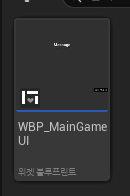
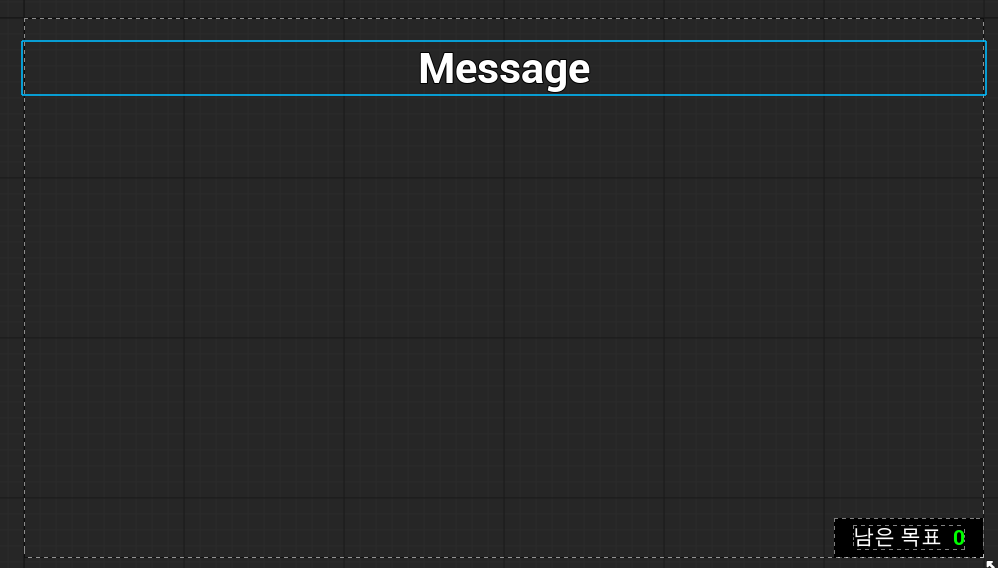
UI 폴더를 새로 만들고 위젯 블루프린트를 만들었다. 그리고 내가 생각한대로 내용을 만들었다. 화면 상단 가운데에 출력할 큰 텍스트 1개, 화면 하단 우측에서 경찰 또는 도둑의 남은 목표(경찰이면 생존한 도둑 수, 도둑이면 앞으로 훔칠 물건 수)를 출력하기 위해 텍스트 2개를 사용했다.
상단 메세지는 외곽선을 적용했고 우측 하단 텍스트는 가로 박스(Horizontal Box)를 사용하여 검은 배경을 가지게 했으며 두 텍스트가 나란히 있게 했다. 두 텍스트 사이가 붙으면 곤란하니 패딩을 적용했다.
private:
	const FString READY_MESSAGE = TEXT("잠시 후 게임이 시작됩니다.");
	const FString ROLE_THIEF_MESSAGE = TEXT("당신은 도둑입니다.");
	const FString ROLE_POLICE_MESSAGE = TEXT("당신은 경찰입니다.");
	const FString REMAINING_BEFORE_START = TEXT("남은 목표");
	const FString REMAINING_TARGET_THIEF = TEXT("훔칠 물건");
	const FString REMAINING_TARGET_POLICE = TEXT("남은 도둑");
	const FString THIEF_WIN_MESSAGE = TEXT("도둑 승리!");
	const FString POLICE_WIN_MESSAGE = TEXT("경찰 승리!");
각 텍스트에 적용할 내용을 위젯의 헤더에 미리 적어놨다. 시작 준비시 띄울 메세지, 게임 시작후 역할 알림 등 여러가지를 적었다.
public:
	UMainGameUI(const FObjectInitializer& ObjectInitializer);

	//플레이어 컨트롤러에서 이 위젯 추가후 실행해야 할 함수
	void AfterAddToViewport() const;

	//게임 준비
	void BeginReady() const;

	//경찰 또는 도둑으로 게임 시작
	void GameStart(const bool bPolice);

	//남은 대상의 개수
	void SetTargetCount(const int32 TargetCount) const;

	//게임 종료
	void GameEnd(const bool bPoliceWin) const;

private:
	//화면 중앙 텍스트 제거용 타이머 핸들
	FTimerHandle EraseDelayHandle;

	//게임 시작후 몇 초 동안 화면 중앙 메세지를 남기나
	UPROPERTY(EditDefaultsOnly, meta = (AllowPrivateAccess = true))
	float EraseDelayTime;
그리고 각 텍스트에 띄울 내용이 언제 필요한지를 생각하여 함수도 선언했다. 유저 위젯의 생성자는 저런 식으로 선언하지 않으면 컴파일 에러가 발생한다.
참고로 타이머 핸들 및 같이 사용할 float변수는 게임 시작후 메세지를 사라지게 만들 때 사용하려고 선언했다. 사실 텍스트 내용만 지우는 것인데 이게 위젯의 애니메이션으로 구현하는것이 간단하지 않아서 타이머를 선택했다.
UMainGameUI::UMainGameUI(const FObjectInitializer& ObjectInitializer) : Super(ObjectInitializer)
{
	EraseDelayTime = 5.f;
}

void UMainGameUI::AfterAddToViewport() const
{
	MainMessage->SetText(FText::GetEmpty());
	RemainingLabel->SetText(FText::FromString(REMAINING_BEFORE_START));
	RemainingCountText->SetText(FText::FromString(TEXT("0")));
}

void UMainGameUI::BeginReady() const
{
	MainMessage->SetText(FText::FromString(READY_MESSAGE));
}

void UMainGameUI::GameStart(const bool bPolice)
{
	//경찰 또는 도둑임을 알림
	MainMessage->SetText(FText::FromString(bPolice ? ROLE_POLICE_MESSAGE : ROLE_THIEF_MESSAGE));

	//역할별 목표를 하단에 출력
	RemainingLabel->SetText(FText::FromString(bPolice ? REMAINING_TARGET_POLICE : REMAINING_TARGET_THIEF));

	//중앙 텍스트는 잠시후 사라짐
	GetWorld()->GetTimerManager().SetTimer(EraseDelayHandle, ([&]()
	{
		MainMessage->SetText(FText::GetEmpty());

	}), EraseDelayTime, false);
}

void UMainGameUI::SetTargetCount(const int32 TargetCount) const
{
	RemainingCountText->SetText(FText::FromString(FString::FromInt(TargetCount)));
}

void UMainGameUI::GameEnd(const bool bPoliceWin) const
{
	MainMessage->SetText(FText::FromString(bPoliceWin ? POLICE_WIN_MESSAGE : THIEF_WIN_MESSAGE));
}
함수의 내용은 목적에 따라 텍스트의 내용을 바꾸고, 게임 시작후 타이머를 사용해 메세지를 사라지게 하는 내용이다. 단, 처음 초기화시 중앙 메세지는 내용은 지운다.
private:
	//위젯 클래스
	UPROPERTY(EditDefaultsOnly, Category = "Widget", meta = (AllowPrivateAccess = true))
	TSubclassOf<UMainGameUI> MainGameUIClass;

	//생성한 위젯
	UPROPERTY()
	UMainGameUI* MainGameUI;
void AMainGamePlayerController::BeginPlay()
{
Super::BeginPlay();
//로컬이면 UI 생성
if (IsLocalPlayerController())
{
MainGameUI = CreateWidget<UMainGameUI>(this, MainGameUIClass);
if (IsValid(MainGameUI))
{
MainGameUI->AddToViewport();
MainGameUI->AfterAddToViewport();
}
else
{
UE_LOG(LogHiddenThief, Error, TEXT("'%s' : 위젯을 찾을 수 없습니다."), *GetNameSafe(this));
}
}
}
위젯을 만들었으니 플레이어 컨트롤러에서 띄우게 만들자

중앙 메세지는 처음에는 안보이니 오른쪽 아래만 보면 되는데, 잘 적용됨을 확인했다.
B. 생성한 위젯을 게임모드가 사용하는 방법
위젯은 각 클라이언트 개인마다 각각 있고 네트워크에 공유되지 않는다. 그리고 서버에는 없다. 따라서 서버인 게임모드에서는 위젯에 직접 접근할 수 없다. 대신 RPC를 사용한 간접적인 방법을 써야 한다.
public:
	//게임 준비를 출력
	UFUNCTION(Client, Reliable)
	void BeginReady() const;

	//경찰 또는 도둑으로 게임 시작해서 위젯 내용을 변경
	UFUNCTION(Client, Reliable)
	void GameStart(const bool bPolice) const;

	//남은 대상의 개수 갱신
	UFUNCTION(Client, Reliable)
	void SetTargetCount(const int32 TargetCount) const;

	//게임 종료를 출력
	UFUNCTION(Client, Reliable)
	void GameEnd(const bool bPoliceWin) const;
플레이어 컨트롤러에서 위젯과 동일한 이름과 형식을 가지는 함수를 선언한다. 이때, 클라이언트 RPC 함수로 선언해야 한다.
void AMainGamePlayerController::BeginReady_Implementation() const
{
	MainGameUI->BeginReady();
}

void AMainGamePlayerController::GameStart_Implementation(const bool bPolice) const
{
	MainGameUI->GameStart(bPolice);
}

void AMainGamePlayerController::SetTargetCount_Implementation(const int32 TargetCount) const
{
	MainGameUI->SetTargetCount(TargetCount);
}

void AMainGamePlayerController::GameEnd_Implementation(const bool bIsPolice) const
{
	MainGameUI->GameEnd(bPoliceWin);
}
각 함수는 생성한 위젯에 있는 동명의 함수를 호출한다.
private:
	//접속한 플레이어
	UPROPERTY()
	TArray<AMainGamePlayerController*> InGamePlayers;

	//경찰인 플레이어
	UPROPERTY()
	AMainGamePlayerController* PolicePlayer;
이제 게임 모드는 접속한 클라이언트의 플레이어 컨트롤러를 보관한다.
void AMainGameMode::OnPostLogin(AController* NewPlayer)
{
	Super::OnPostLogin(NewPlayer);

	//접속한 플레이어의 컨트롤러를 TVector에 보관
	InGamePlayers.Add(Cast<AMainGamePlayerController>(NewPlayer));

	//플레이어 수 증가, 2명 이상이면 게임 시작 준비
	if (InGamePlayers.Num() >= 2 && CurrentGameState == EGameState::NotPlaying)
	{
		CurrentGameState = EGameState::ReadyToPlay;
		GetWorld()->GetTimerManager().SetTimer(ReadyToPlayTimer, this, &AMainGameMode::GameStart, ReadyTime, false);
        PlayerCount = InGamePlayers.Num();

		//모든 플레이어에게 준비를 알림
		for (const AMainGamePlayerController* Player : InGamePlayers)
		{
			Player->BeginReady();
		}
	}
}
TArray가 추가됨에 따라 OnPostLogin의 내용이 바뀌었다. 원래는 플레이어 수만 증가 시켰고 그 수를 확인하여 게임을 시작했지만 이제는 TArray의 길이를 확인한다. 다만 플레이어 수 자체는 게임 시작시 도둑의 수를 결정하기 때문에 여전히 필요하니 게임 시작시 TArray의 길이 값을 사용한다.
게임 준비를 시작하는 if문의 말미에 각 클라이언트에게 게임 준비를 알리는 위젯 함수를 실행하기 위해 플레이어 컨트롤러의 함수를 각각 실행한다.
void AMainGameMode::GameStart()
{
	//게임 시작
	CurrentGameState = EGameState::Playing;
	ThiefCount = PlayerCount - 1;

	//경찰로 지목될 플레이어 순번
	const int32 PoliceIndex = FMath::RandRange(1, PlayerCount);

	//경찰 1명, 나머지 도둑
	int32 PlayerIndex = 1;
	for (AMainGamePlayerController* Player : InGamePlayers)
	{
		if (const AMainGameCharacter* PlayerChar = Cast<AMainGameCharacter>(Player->GetPawn()))
		{
			if (AMainGamePlayerState* PlayerState = Cast<AMainGamePlayerState>(PlayerChar->GetPlayerState()); IsValid(PlayerState))
			{
				PlayerState->bPolice = PoliceIndex == PlayerIndex;
                Player->GameStart(PlayerState->bPolice);
				if (PlayerState->bPolice)
				{
					PolicePlayer = Player;
					Player->SetTargetCount(ThiefCount);
				}
				else
				{
					Player->SetTargetCount(ThiefTarget);
				}
			}
		}
		++PlayerIndex;
	}
}
게임 시작 함수도 변경했다. 단순히 위젯 접근을 위한 플레이어 컨트롤러 접근만이 추가된 것이 아니다. 원래는 TActorIterator를 사용하여 맵 내의 모든 캐릭터를 직접 찾았지만 이젠 TArray로 보관중인 플레이어 컨트롤러를 통해 캐릭터에게 접근하면 된다. 그리고 여기서 경찰인 플레이어를 따로 보관한다.
도둑의 수와 게임 상태도 함수의 앞쪽으로 가져왔다. 각 역할별 남은 타켓의 수를 각 클라이언트에게 전달해야 하기 때문이다.
void AMainGameMode::TargetStolen()
{
	if (CurrentGameState != EGameState::Playing)
	{
		return;
	}

	//훔칠 대상의 수를 줄이고 게임 종료인지 확인
	bool bGameEnd = false;
	if (--ThiefTarget <= 0)
	{
		CurrentGameState = EGameState::EndOfGame;
		bGameEnd = true;
	}

	for (const AMainGamePlayerController* Player : InGamePlayers)
	{
		//경찰이 아니면 남아있는 훔칠 대상을 출력
		if (Player != PolicePlayer)
		{
			Player->SetTargetCount(ThiefTarget);
		}

		//게임 종료시
		if (bGameEnd)
		{
			Player->GameEnd(false);
		}
	}
}
도둑이 물건을 훔쳤으면 경찰 이외의 플레이어에게 남은 개수를 출력한다. 모두 훔쳤다면 도둑의 승리임을 보여준다.
void AMainGameMode::ThiefDeath()
{
	if (CurrentGameState != EGameState::Playing)
	{
		return;
	}

	//도둑의 수를 줄임, 게임 종료시 모두에게 알림
	if (--ThiefCount <= 0)
	{
		CurrentGameState = EGameState::EndOfGame;
		for (const AMainGamePlayerController* Player : InGamePlayers)
		{
			Player->GameEnd(true);
		}
	}

	//경찰에게 남은 도둑의 수를 출력
	PolicePlayer->SetTargetCount(ThiefCount);
}
경찰이 도둑을 죽이면 경찰에게 남은 도둑의 수를 갱신하고 그 수가 0이라면 경찰 승리임을 보여준다.
C. 네트워크 환경에서는 순서를 명확하게
문제가 생겼다. 2번째로 접속한 클라이언트에서 에러가 발생해서 게임 시작을 할 수 없다.
//모든 플레이어에게 준비를 알림
for (const AMainGamePlayerController* Player : InGamePlayers)
{
    Player->BeginReady();
}
문제를 확인해보니 2번째 플레이어가 접속하자 마자 게임 모드가 준비를 하는 것에서 버그를 발견했다.
void UMainGameUI::BeginReady() const
{
	MainMessage->SetText(FText::FromString(READY_MESSAGE));
}
게임 모드는 2번째 플레이어의 접속을 감자하자마자 코드대로 플레이어 컨트롤러의 함수를 실행하는데, 여기에 연결된 위젯 함수에서는 막 접속한지라 아직 바인딩 되기 전의 시점이었다. 그래서 코드에서 이 텍스트는 null인데 여기에 접근하려고 하는 문제였다.
void AMainGameMode::OnPlayerControllerReady(AMainGamePlayerController* NewPlayer)
{
	//접속한 플레이어의 컨트롤러를 TVector에 보관
	InGamePlayers.Add(NewPlayer);

	//플레이어 수 증가, 2명 이상이면 게임 시작 준비
	if (InGamePlayers.Num() >= 2 && CurrentGameState == EGameState::NotPlaying)
	{
		CurrentGameState = EGameState::ReadyToPlay;
		GetWorld()->GetTimerManager().SetTimer(ReadyToPlayTimer, this, &AMainGameMode::GameStart, ReadyTime, false);
		PlayerCount = InGamePlayers.Num();

		//모든 플레이어에게 준비를 알림
		for (const AMainGamePlayerController* Player : InGamePlayers)
		{
			Player->BeginReady();
		}
	}
}
여기서 내가 선택한 해결 방법은, OnPostLogin으로 자동으로 실행되는 함수가 아니라 직접 호출해야 하는 함수로 만드는 것이다. 자체 제작 함수를 만들고 기존의 OnPostLogin의 내용을 옮겼다. 당연히 Super::OnPostLogin 호출은 제거해야 한다. 자체 제작 함수를 만드는 김에 매개변수는 AController가 아닌 내가 만든 플레이어 컨트롤러로 변경했다.
//서버에게 준비 완료를 알림
	UFUNCTION(Server, Reliable)
	void AlertReadyToServer();
void AMainGamePlayerController::AlertReadyToServer_Implementation()
{
AMainGameMode* MainGameMode = Cast<AMainGameMode>(GetWorld()->GetAuthGameMode());
MainGameMode->OnPlayerControllerReady(this);
}그리고 플레이어 컨트롤러에서는 위젯 준비가 완료된 다음에 게임 모드의 함수를 호출해야 하는데, 위젯은 서버에 없기 때문에 서버의 컨트롤러에서는 언제 호출해야 하는지 알 수 없다. 대신 서버 RPC를 만들고 클라이언트가 이 함수를 호출하면 될 것이다.
void AMainGamePlayerController::BeginPlay()
{
	Super::BeginPlay();

	//로컬이면 UI 생성
	if (IsLocalPlayerController())
	{
		MainGameUI = CreateWidget<UMainGameUI>(this, MainGameUIClass);
		if (IsValid(MainGameUI))
		{
			MainGameUI->AddToViewport();
			MainGameUI->AfterAddToViewport();

			//위젯 준비가 완료되면 서버에게 준비됨을 알린다.
			AlertReadyToServer();
		}
		else
		{
			UE_LOG(LogHiddenThief, Error, TEXT("'%s' : 위젯을 찾을 수 없습니다."), *GetNameSafe(this));
		}
	}
}
클라이언트의 컨트롤러에서 위젯 준비가 완료된 다음 서버 RPC 함수를 통한 게임 모드 함수를 실행하면 된다.
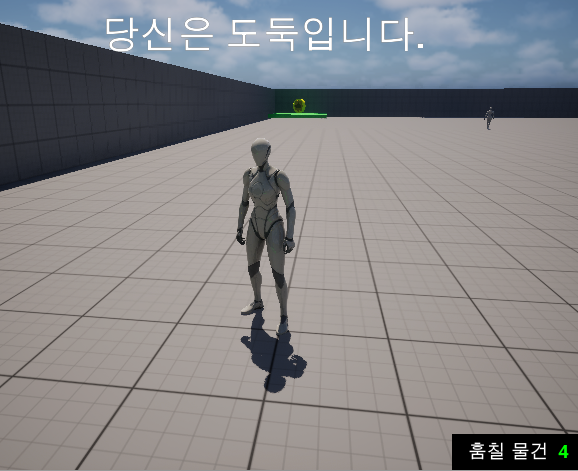
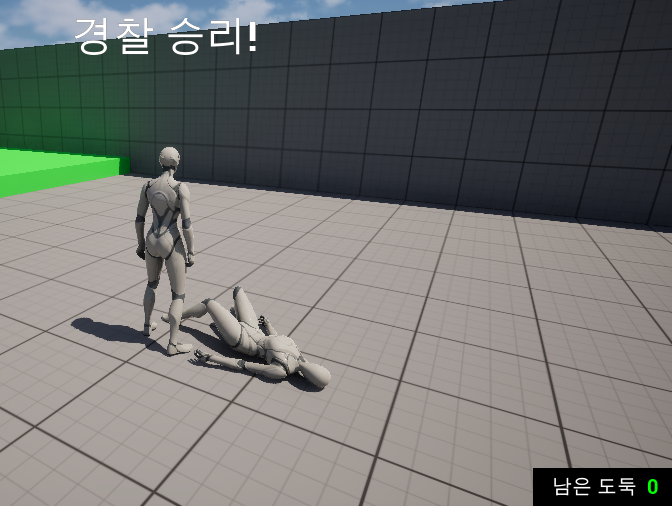
문제가 잘 해결되었고 UI가 정상적으로 작동함을 확인했다.
'언리얼엔진 학습 및 과제' 카테고리의 다른 글
| 소울라이크 팀 프로젝트 Desecration : 시작부터 MVP까지 (1) (0) | 2026.03.18 |
|---|---|
| 액터 리플리케이션을 이용한 게임 제작 (12) (0) | 2026.01.14 |
| 액터 리플리케이션을 이용한 게임 제작 (10) (0) | 2026.01.08 |
| 액터 리플리케이션을 이용한 게임 제작 (9) (0) | 2026.01.06 |
| 액터 리플리케이션을 이용한 게임 제작 (8) (0) | 2026.01.05 |